ATS-Friendly Resume Format: What Actually Works in 2026
Your Resume Might Be Getting Rejected by Software
Here's a fact that surprises most job seekers: at large companies, over 75% of resumes are filtered out by software before a recruiter ever sees them. That software is called an Applicant Tracking System, or ATS.
An ATS parses your resume file, extracts text, and tries to match your qualifications against the job requirements. If it can't read your resume properly — because of formatting issues, unusual layouts, or embedded graphics — your application effectively doesn't exist.
The good news: ATS-friendly formatting isn't complicated. It just requires knowing the rules.
The Format Rules That Actually Matter
Use a Single-Column Layout
Two-column and sidebar layouts look great on screen, but many ATS parsers read content left-to-right, top-to-bottom. A sidebar throws off the reading order, mixing your contact info with your work experience in unpredictable ways.
Stick to a single column. Full width. Top to bottom.
Use Standard Section Headings
ATS software looks for recognizable section headers to categorize your information. Use these exact headings:
- Work Experience (not "Where I've Made an Impact")
- Education (not "Academic Journey")
- Skills (not "My Toolkit")
- Summary or Profile (not "About Me")
- Certifications (not "Credentials & Badges")
Creative headings confuse parsers. Save the creativity for your cover letter.
No Graphics, Icons, or Images
That skills bar chart showing "Python: 90%"? The ATS sees nothing. Same for icons next to your contact details, headshot photos, and decorative lines made from images.
ATS parsers extract text. If information is embedded in an image, it's invisible. Use plain text for everything.
No Tables for Layout
Tables are one of the most common ATS-breaking formats. Many parsers either skip table content entirely or scramble the cell order. Don't use tables to arrange your resume layout.
If you need to list skills in multiple columns, use tab-separated text — not a table.
Use a Standard Font
Stick with fonts that every system can render: Arial, Calibri, Times New Roman, Helvetica, or Georgia. Custom or decorative fonts can cause character rendering issues during parsing.
Submit as PDF (Usually)
PDF preserves your formatting across devices and is the most reliably parsed format by modern ATS systems. Some older ATS platforms prefer .docx — if a job posting specifically asks for Word format, send Word. Otherwise, PDF is the safer choice.
Common Mistakes That Get Resumes Rejected
Headers and Footers
Many ATS parsers skip header and footer regions entirely. If your name, email, or phone number is in the header, the system might not extract your contact information at all. Put everything in the main body.
Fancy File Names
Name your file clearly: FirstName-LastName-Resume.pdf. Not final_v3_updated_NEW.pdf. Some ATS systems display the filename to recruiters.
Keyword Stuffing in White Text
Some candidates hide keywords in white text, thinking the ATS will read them but humans won't see them. Most modern ATS systems detect this and flag it as deceptive. Recruiters who view the parsed text will see it too. Don't do this.
Using Abbreviations Without Spelling Them Out
If the job asks for "Search Engine Optimization" and your resume only says "SEO," some parsers won't make the connection. Write it out at least once, then use the abbreviation: "Search Engine Optimization (SEO)."
How to Match Keywords Naturally
The goal isn't to stuff your resume with keywords. It's to use the same terminology the job description uses, in context.
Read the job description carefully. If it says "project management," use "project management" — not "managing projects" or "PM." If it lists "Python, SQL, and Tableau," put those exact terms in your skills section.
The trick is incorporating these terms into real descriptions of your work:
"Led a cross-functional project management initiative using Python and SQL to analyze customer data, resulting in a 15% improvement in retention."
That sentence is keyword-rich and genuinely describes what you did. That's the standard to aim for.
Why We Built an ATS-Optimized Resume Builder
Most resume builders use Word or Google Docs templates. These are convenient, but they're also the source of most ATS formatting problems — hidden tables, inconsistent spacing, embedded objects that break parsing.
Jobbital's CV Hub uses LaTeX to generate resumes. LaTeX produces clean, structured PDFs with consistent formatting that ATS parsers read perfectly every time. No hidden formatting artifacts, no tables used for layout, no images breaking text flow.
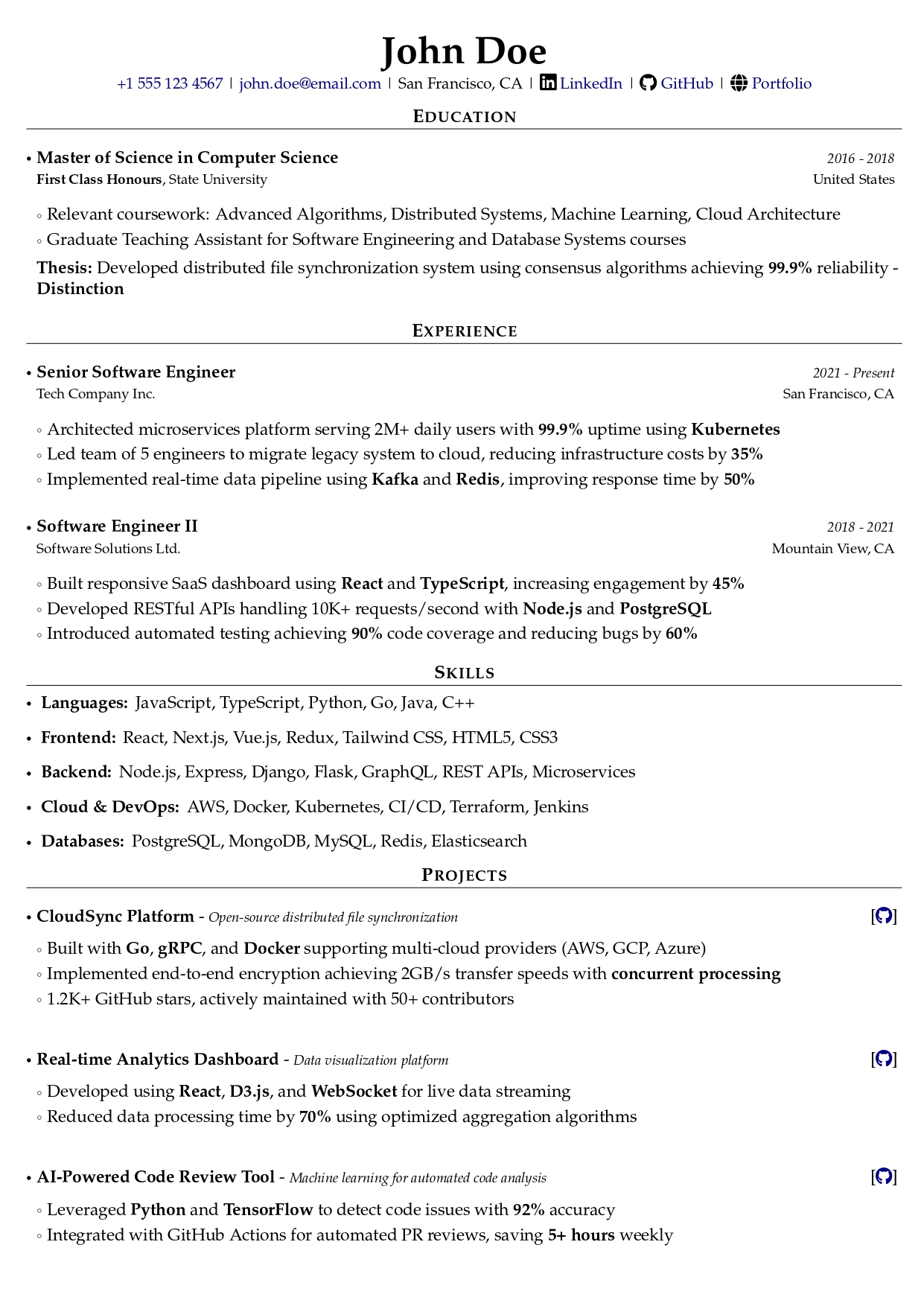
You get professional templates that are guaranteed to be ATS-compatible. Upload an existing PDF resume and Jobbital converts it to LaTeX automatically. Every edit creates a new version with full history, so you can always go back.
When you're applying to a specific job, one-click AI tailoring rewrites your CV to match the job description — incorporating the right keywords naturally, not just stuffing them in.
Quick Checklist Before You Submit
- Single-column layout — no sidebars or multi-column designs
- Standard headings — Work Experience, Education, Skills, Summary
- No images or graphics — everything is plain text
- No tables for layout — use regular text formatting
- Contact info in body — not in headers or footers
- PDF format — unless the posting specifically asks for .docx
- Keywords from the job description — used naturally in context
- Clean file name — FirstName-LastName-Resume.pdf
- Spell out abbreviations — at least once before using the short form
Try Jobbital's Resume Builder
See how Jobbital's Resume Builder can help — free to start.
No credit card required. Free plan available.